+44 7460 751919


Among the hottest topics and a rising one are eBooks, providing a rich and solid platform where you can easily share your ideas into compelling digital experiences.
As per the new study, the readers of eBooks are expected to reach over 1 billion. And that is a huge number.
So, it is never too late to become a book author, and you will have a lucrative career. In order to create digital books, the better method to write them is to self-publish as an author.
This method is very much simpler than printing one. It does not matter which kind of content you want to share with your audience, like a novel, an academic paper or a piece of fiction.
Whether you are a seasoned author or a new one, publishing an eBook is a huge work, and it will take a lot of time.
To ease your journey and streamline your process, in this guide, I will talk about the 10 best software for digital books.
What is a Ebook? and How is it Created?
In essence, an ebook is an electronic book that can be read on a variety of devices, such as e-readers, tablets, smartphones, and computer screens.
You need to be aware of the changes between common formats such as EPUB, Word documents, and PDF files in order to completely grasp what eBooks are and how they appear.
Here are the essential steps of crafting an E-book.
- Planning & Writing: In the first step, use programs like Scrivener, Word, or Google Docs to write content, classify the target audience, and outline chapters.
- Formatting and Design: Now add graphics, make a clickable table of contents, and use consistent styles (Heading 1 and Heading 2).
- Cover Design: To design a digital book, use Canva, Adobe InDesign, or KD to create a visually appealing cover.
- Conversion: Convert the document to EBOOK-compatible formats, mostly PDF (fixed layout) or EPUB (reflowable text for e-readers).
Publishing & Distribution: To end with files to websites such as Sellfy, Apple Books, and Amazon KDP.
Best Tools and Software for Crafting an eBook in 2026
1. Grammarly
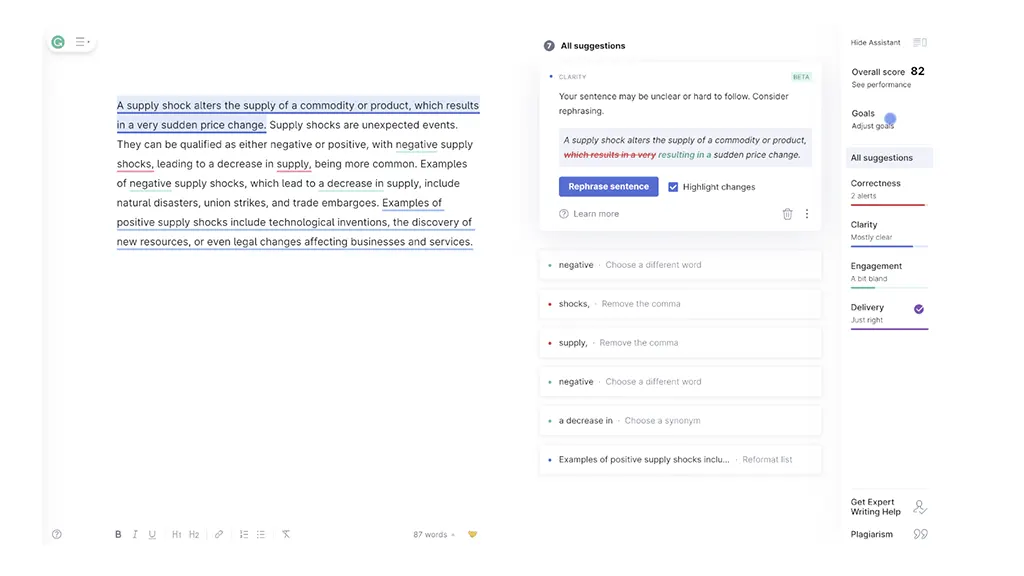
Grammarly is an application or browser extension that instantly assesses your writing on a variety of platforms, such as Facebook, WordPress, Microsoft Word, and more, for plagiarism, grammar, and spelling errors.
In fact, the name of this grammar program is your "Free Grammar Assistant.’’ Whereas the paid Grammarly has plenty of features.
Top Features
- Advanced Proofreading and Grammar:
First and foremost, Grammarly corrects spelling mistakes, grammatical errors, and punctuation issues in just a few seconds.
- AI Writing Assistant:
Additionally, it generates, rewrites, and paraphrases your texts. It can also change the tone of your writing, improve clarity, and shorten your sentences.
- Plagiarism Checker:
You don’t have to use other plagiarism checking tools. Instead, use Grammarly to ensure originality in your writing. It also provides citation suggestions, making it ideal for academic users.
- Multilingual Support:
In addition to this, Grammarly helps with translation in multiple languages, including:
- English
- Spanish
- French
- German
- Portuguese
- Italian
- App Integration and Browser Integration:
You can also use Grammarly across various platforms and desktop applications, such as:
- Gmail
- Slack
- Google Docs
Pros:
- Real-time. Once you type, a real-time grammar and spell checker rapidly detects typos and punctuation issues.
- Tone and Style Suggestions: Provides premium suggestions for enhancing tone (e.g., more formal or confident) and clarity and conciseness.
- Accessibility: Compatible with desktop software, browser extensions, and mobile devices (web browsers, email, and Microsoft Word).
To buy a premium Grammarly tool, you purchase it from the best ebook maker UK. The brand has all kinds of tools available.
Cons:
- Contextual Errors: From time to time, has trouble with subtleties, offering inapt synonyms or turning grammatically sound sentences into ones that don't make sense.
- Cost: Because the premium edition can be pricey, casual users might not find it worthwhile.
- Overcorrection: Trying to alter stylistic decisions may promote inflexible, formulaic writing.
2. Visme
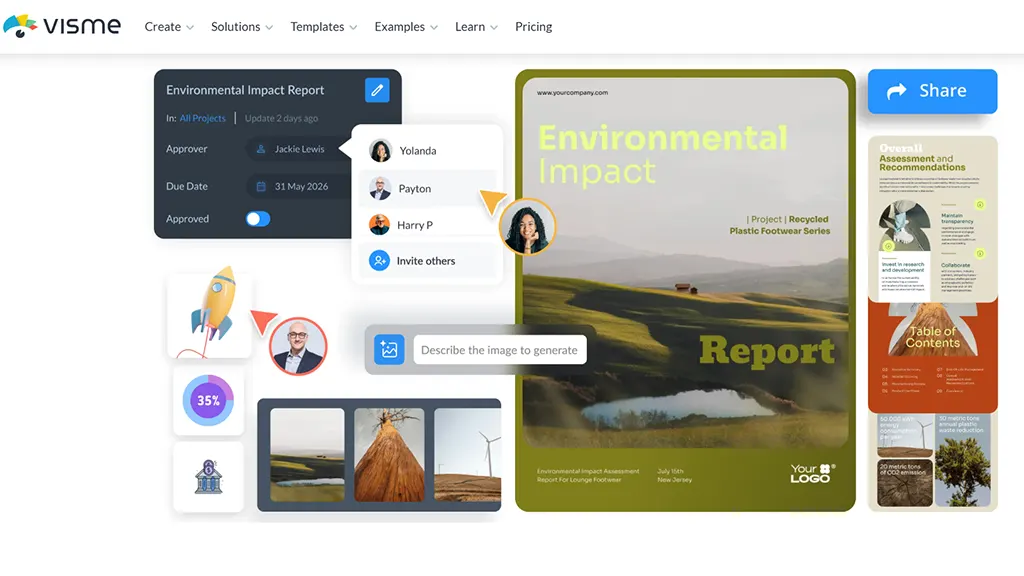
Visme is an all-in-one design platform with more than 18 million users in 133 countries. Marketers and entrepreneurs can use Visme to produce branded films, brochures, ebooks, interactive presentations, and other materials.
Top Features
- AI Design Tools:
Visme is one of the best AI design tools that helps generate images, presentations, and text. You just have to write clear and actionable prompts.
Moreover, it can generate animated figures, charts, and graphs to make your data interesting and engaging.
In addition to this, you can also access thousands of professional and customisable templates. You can easily use these templates for your presentation, documents, and even social media.
To ensure that your brand consistency is maintained, Visme allows you to store colours, fonts, and logos. They are automatically applied to your projects.
Besides, Visme is also one of the best tools for team collaboration on projects. Also, users can comment and add notes to the projects.
Pros:
- Simple to use. Users don't need to know how to code or design.
- To add your brand's font, colours, and logo to your ebook, use the Brand Wizard.
- E-books can be exported in HTML5, JPG, PNG, and PDF formats. Either embed your ebook on your website or share it online with a link.
Cons:
- The tool does not allow for grammar or punctuation editing.
- Making your own animations or altering existing ones might be hard.
- Your digital book cannot be exported to readers as an EPUB file.
If you do not want to use visme tool, just hire a quality and maven hire book writer. A good author has the qualities you need to create a quality book.
3. Google Docs
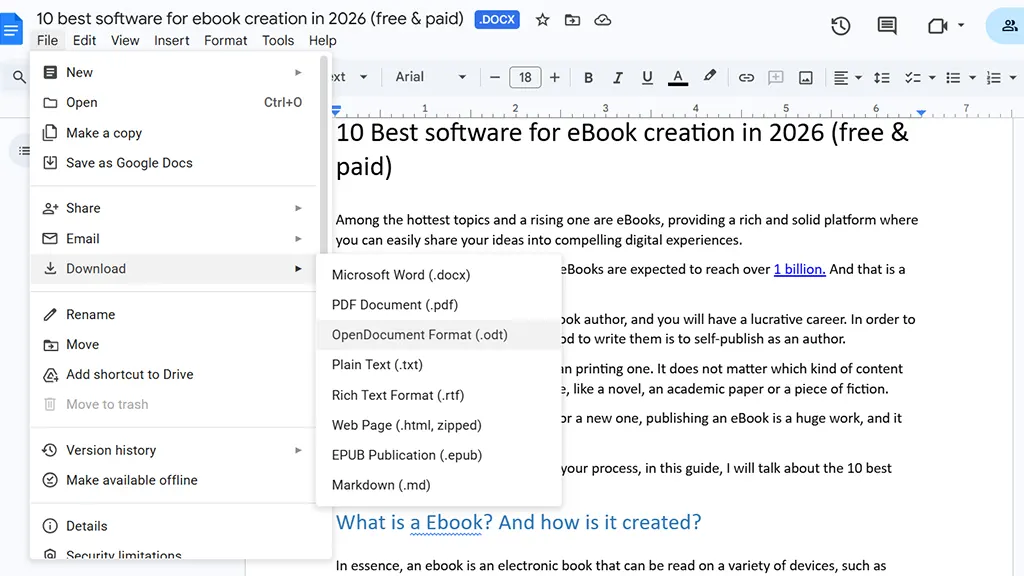
One more great and versatile look is Google Docs. The tool is simple to use; it has the cloud based features. Also, this tool aids you in accessing your manuscripts from any device.
With docs you can work with editors, beta editors and even designers. All you need to share the file with them.
Hence, you will save a lot of time in rework, as they can also include comments in real time. The tool also allows you to make an eBook in both formats, like PDF and EPUB. The great thing about this tool its free.
Top Features
Google Docs is an ideal tool for you if you have to edit a document with multiple users at the same time. It allows users to comment, suggest, and mention others on the assigned documents.
Also, you can view and restore any version of the document. You can even know who made the changes and when the changes were made.
Google Docs also allows you to save the changes automatically to Google Drive. You can access these documents from any device you want.
You can also continue editing your documents even without an internet connection. Your files will automatically sync once back online.
Furthermore, you can dictate your text directly into the document. You can enable voice typing under the ‘Tools’ menu.
Pros:
- Real-time Collaboration: The best part about Google Docs is that several people can view, comment on, and edit your content at once.
- Cost & Accessibility: The tool is accessible from any internet-connected device, and it is free to use with a Google account. So, all you need to do is sign up.
- Automatic Saving: There is no chance of work being lost because changes are stored automatically.
Get Expert Ebook Writer & Editor Right Away!
Still have not figured out how to create an e-book in a Google Doc? Reach out to a professional writer. By hiring a quality writer, you will not miss anything. From writing to editing to formatting, you will learn a lot.
Get in Touch Now!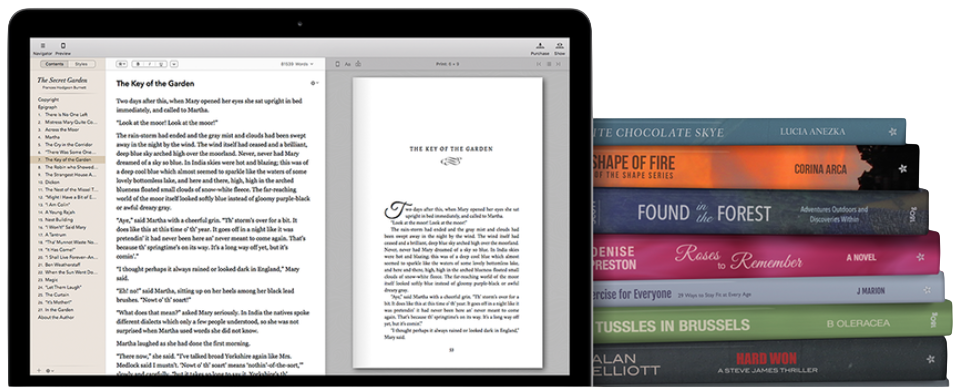
Cons:
- Limited Formatting: In contrast to Microsoft Word, it lacks classy layout, design, and formatting tools.
- Internet Dependency: Mostly cloud-based, yet there is an offline mode that is less dependable and requires setup.
- Huge File Performance: When working with huge files or ones that contain a lot of photographs, it may become laggy or slow.
4. The Scrivener
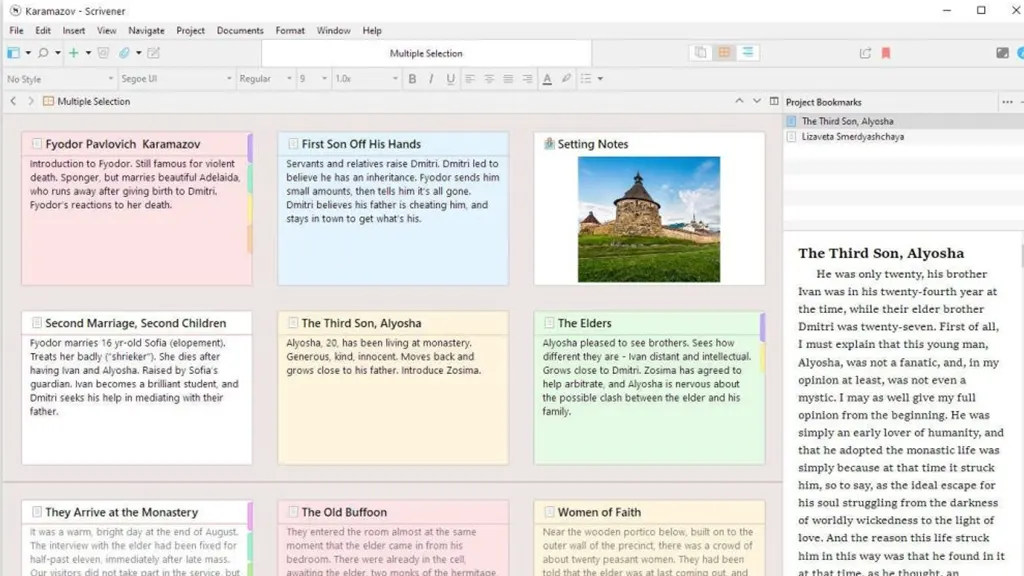
Scrivener is an effective tool for creating, organising, and editing eBooks.
Moreover, it offers all the resources required to get your work ready for submission or self-publishing.
This ebook creation software is recognised as the ideal collaborator for authors, publishers, and screenwriters.
Top Features
- Acts as a Central Hub:
First of all, the Scrivener app acts as a central hub. It helps you keep the manuscripts, research files, notes, and PDFs well-organised. This means that you don’t have to use multiple apps or tabs.
The Scrivener app is also ideal for writers, allowing them to visualise their projects using index cards for each chapter or scene. It helps writers to rearrange or restructure the plot more easily.
It also helps users to view two documents at the same time, making their work easier and quicker.
Users can also view and edit individual folders as a continuous document. This makes it simple for them to work on specific sections or an entire document at once.
You can also save versions of a document before editing. This allows you to return to previous drafts without much effort.
Pros:
- Superior Organisation: Enables you to use a drag-and-drop binder to rearrange projects into manageable, discrete scenes or chapters.
- Integrated Workspace: The tool can save notes, research, photos, PDFs, and audio files in the same project as your manuscript.
- Cost-effective: The tool is available for both paid and free. So, instead of requiring a subscription, a one-time license price ($59.99 for PC, separate fee for iOS) is used.
Cons:
- Steep Learning Curve: Getting knowledge of the advanced features can be daunting at first.
- No Native Android/Web software: Mostly made for iOS, Windows, and Mac, this software does not have a native version for Android users.
- No Real-Time Collaboration: It is not for real-time editing like Google Docs or co-authoring.
5. Canva
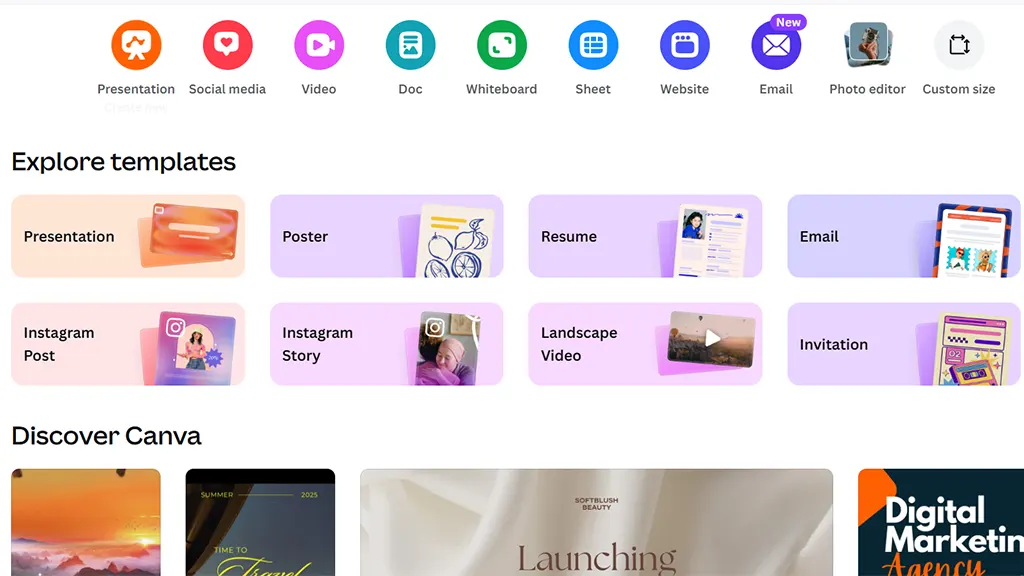
Canva is one of the best ebook tools; it is an app that enables you to create good and engaging visuals. The tool can be used for a lot of projects.
It is basically a graphic design app, and it is free to use. You can easily use it if you do not have any designing skills, compared to Adobe, which is tough to use and only made for Pro designers.
Top Features
- AI Magic Studio:
Canva has different features, such as the Magic eraser to remove unwanted objects from your images. Also, it has the Background Remover and the Magic expand, allowing you to adjust your image’s composition.
Besides that, it also has a Magic Switch feature that instantly changes your designs into different formats, such as a presentation or a blog post. You can also change their size according to different social media platforms.
You can also access millions of free and paid high-quality images, graphics, and icons. Besides that, Canva also has more than 600k customisable templates for social media and presentations.
Moreover, users can also use this tool to create and edit videos. Also, you can add animation to your elements, making engaging content for your social media.
Pro Canva users can also plan and publish their social media content directly from the editor. This means that you don't have to use other apps to schedule your content.
Pros:
- Easy to use. More than 250,000 free templates are available with the Free plan.
- You can quickly alter each page to reflect your branding by using the Brand Kit.
- Post your ebook on social media and monitor views, comments, and shares.
Cons:
- Only JPG, PNG, or PDF files are available for download.
- Even if it is not user-friendly, writing and modifying text within the editor is feasible.
6. Designrr
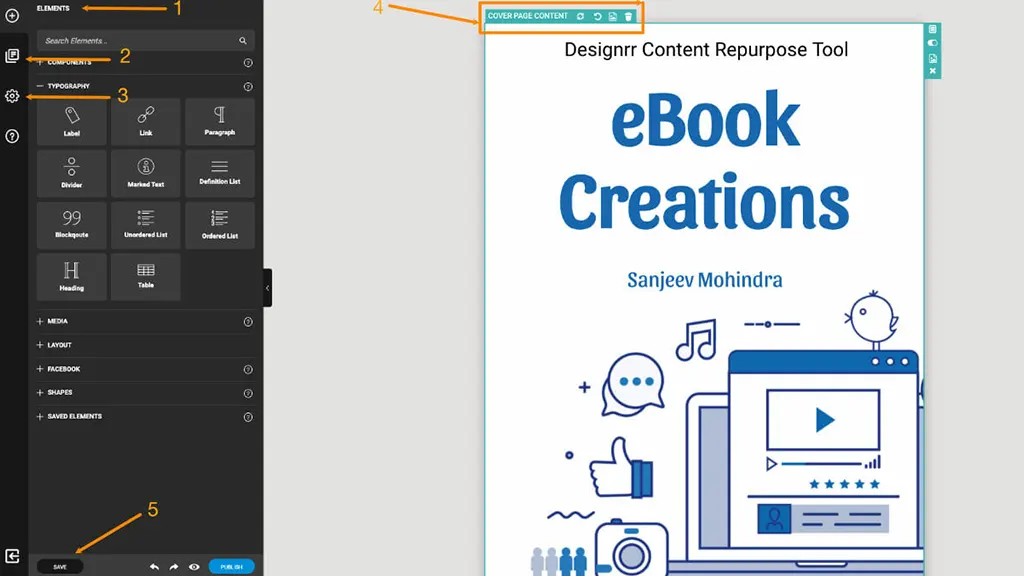
Designrr is the best software for both content marketers and creators. The software has many good features, one of which is that it can almost any content in the shape of a webpage, Google doc or any other editor.
Further, the tool can help you convert into any digital book that you can easily publish. By doing so, you can save plenty of time and money.
Top Features
- Effortless Content Import:
Designrr is one of the best tools for converting existing content into an ebook. You can do this by importing it from website URLs, Google Docs, Word Documents, PDFs, and audio/video files.
It also uses AI to draft, rewrite, and generate outlines. This makes content creation a lot easier and quicker for you.
Designrr also offers hundreds of customisable templates to its users. Besides that, it also has a library of thousands of copyright-free images from Pixabay and Unsplash.
- Automatic Formatting:
You don’t have to waste your time n formatting. Instead, you can use Designrr, as it automatically generates a table of contents and also handles page numbering.
- Audiobook Creations:
It can also convert text content into audiobooks by using AI.
Pros:
- The software offers both Automated page numbering and a table of contents.
- You can import images and posts from your Facebook profile.
- You can easily convert your book into a digital one and can be exported for the Amazon Kindle, PDF, EPUB, or HTML.
Cons:
- The various price tiers and amenities that are included can be hard to grasp.
- There are fewer customisation choices than on other platforms.
6. Vellum
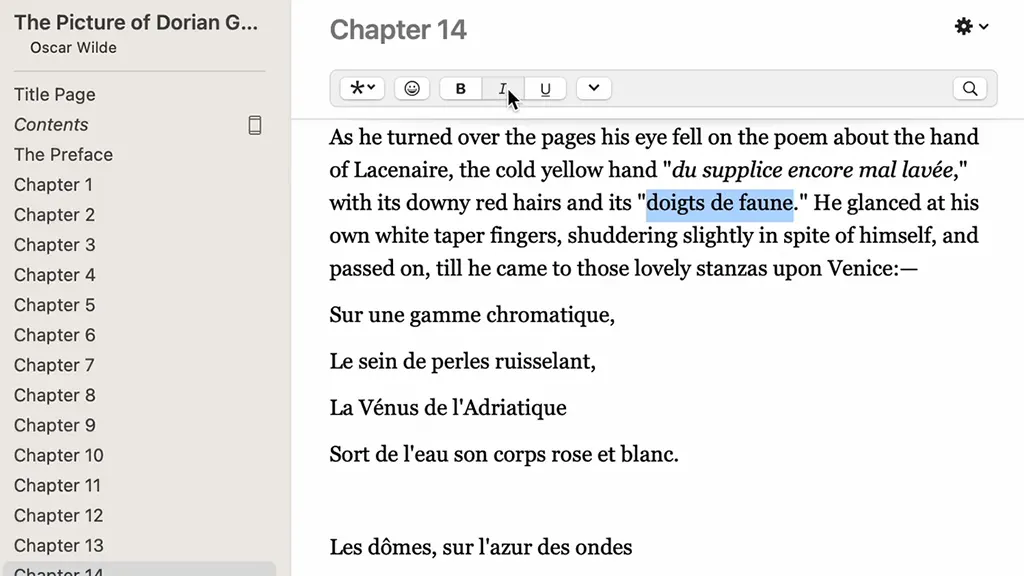
For self-publishing authors looking for an easy-to-use, effective tool to format their eBooks and print books, Vellum is perfect.
Vellum is one of the best ebook creator ideal for authors who seek expertise and design in their book layouts and wish to manage the process on their own.
Top Features
One of the best features of Vellum is that you can see how your formatting actually looks on various devices, such as print, Kindle, iPad, iPhone, etc. What makes it a standout feature is that you can see this while editing and making changes.
It has eight different premium-quality book styles. These styles include:
- Meridian
- Trace
- Oxford
You can apply these styles with just a single click and give your ebook a polished look without putting much effort.
Besides that, Vellum has print-ready PDFs with margins and page numbers. You can print them by just clicking on the print option. Moreover, it also preparers file for EPUB, including Kindle, Apple Books, and Kobo.
Authors have to spend a significant amount of time on basic elements, such as:
- Table of contents
- About the author section
- Page numbering
- Copyright pages
But now, you can save your time by using Vellum as it automates the creation of such elements.
It also allows you to insert images into your ebooks and even adjust their placement and formatting.
Pros:
- Ideal for the formatting of print books and eBooks
- You can produce an infinite number of eBooks and only pay for them when you need to export them.
- The tool is easy to use, and there is no complication.
Cons:
- One of the cons of this tool is not available on Linux and Windows
- Not the most affordable choice available
Different pricing points for eBooks and eBooks plus print
7. Pro Writing Aid
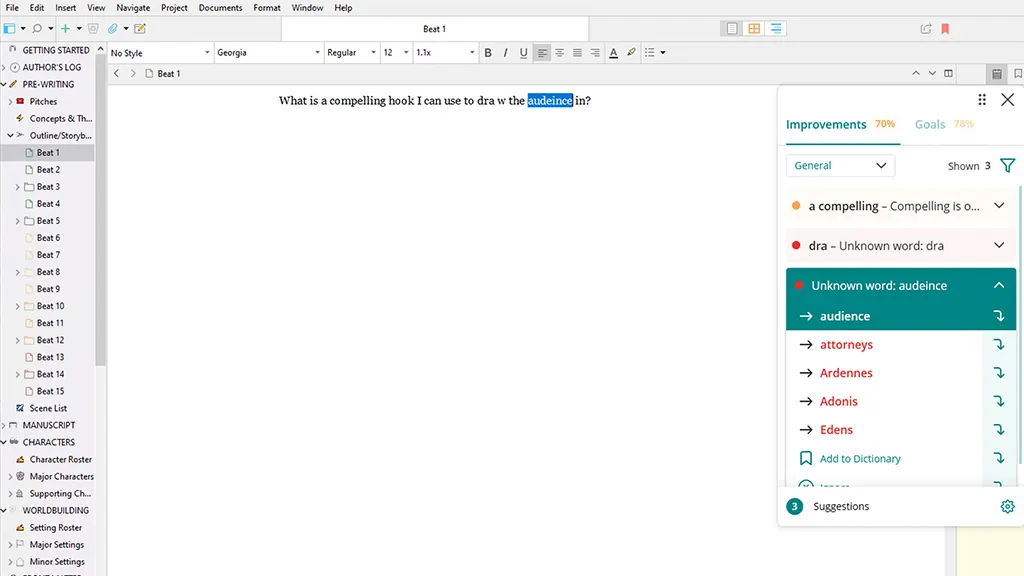
If you are having a hard time with grammar, spelling, or even writing styles Pro Writing Aid can assist you.
This ebook writing software work goes well beyond the built-in spell and grammar check. Also, you should still master grammar. However, Pro Writing Aid can help you identify patterns and evolve as a writer.
There is a great free version available. It can even be integrated into your browser or word processor, allowing you to check your grammar anywhere you write.
Pros:
- Deep editing goes beyond plain grammar and examines passive voice, sentence length, glue words, and clichés.
- Genre Specific Reports: Provides specialised reports on fiction, business, academic, and creative writing.
- Affordable Pricing: Offers a competitive lifetime membership option as well as a capable free version.
Cons:
- No Mobile App: There is no native support for Android or iOS, which limits on-the-go editing.
- Limited Free Version: Only 500 words at a time.
- Plagiarism Checker: It is only available with premium plans or as a separate add-on.
8. Atticus
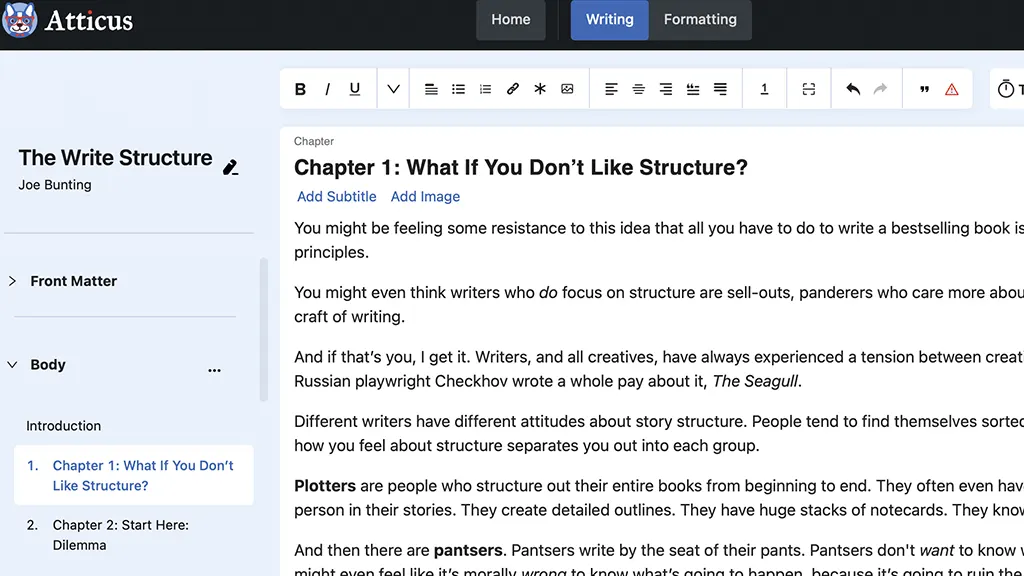
Atticus is a text processor that also functions as eBook formatting software. It has a slew of useful tools, including pre-built eBook templates, chapter planning, and daily word goals, to help you increase productivity.
Also, this ebook software operates across all devices and is less expensive than other solutions on the market - $147 for a lifetime account.
Top Features
One of the best features of Atticus is that it allows writers to write, edit, and format their books within a single platform. This means that you don’t have to jiggle between different platforms for each of the tasks.
In addition, it has over 17 pre-designed templates for both fiction and non-fiction books. It also offers customisable themes, allowing you to create professional ebooks and print books.
You can also export your book to EPUB, DOCX, and print-ready PDF.
Besides that, you can view how your book actually looks on various devices as you format it.
Also, it allows co-authors, editors, and beta readers to work on manuscripts at the same time within the platform.
Pros:
- Cross-platform and reasonably priced: a lifetime license is $147 (as opposed to Vellum's more expensive price) and is compatible with Chromebooks, Macs, Linux, and Windows.
- User-Friendly Interface: Without expert design knowledge, formatting books is simple and intuitive.
Cons:
- Problems with performance: May take a while to load, particularly for really large manuscripts.
- No Free Version: There isn't a free tier available; it must be purchased once.
9. Kindle
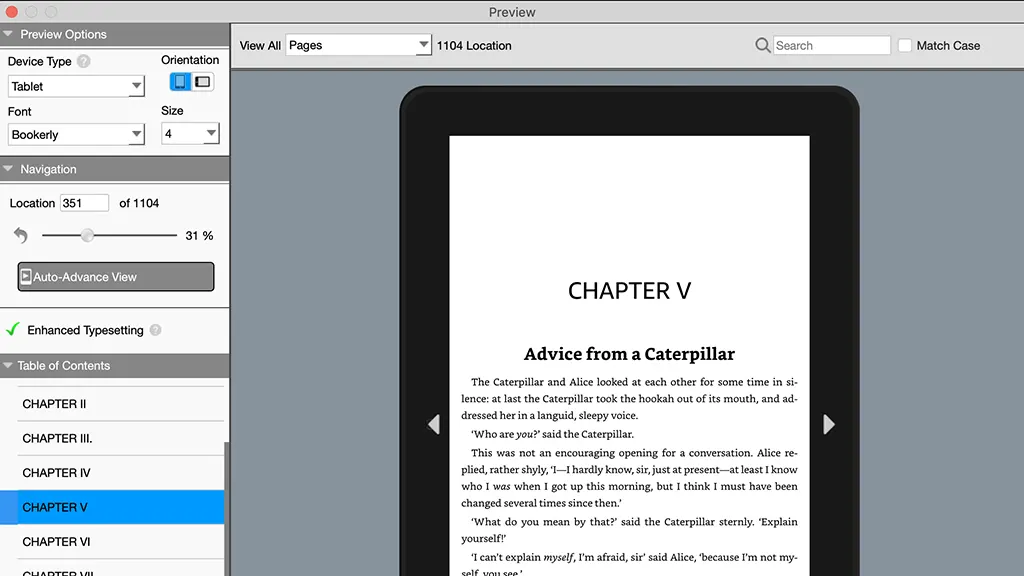
Kindle Create is a free eBook creation tool accessible for both Mac and PC. It is most suited to text-heavy books with photographs, but it may also be used to produce cookbooks and travel guides.
This software will soon include comic eBooks with a guided view, animating panels in movement to advance the tale.
Top Features
To begin with, Kindle Create automatically converts DOC/DOCX manuscripts into Kindle-ready ebooks. This means that you don’t have to waste a significant amount of time on formatting your DOC/DOCX into an ebook.
Furthermore, it detects the titles of chapters from your documents and generates a clickable table of contents.
It also provides pre-designed themes and layouts, allowing you to easily style your chapters and headings.
Moreover, it also generates files that are optimised for publishing on Amazon Kindle Direct Publishing, making your work simpler and faster
Lastly, it allows authors to view how their books will appear on Kindle app and devices.
Pros:
- It's simple to use.
- A free guide on using Kindle Create is available.
Cons:
- Only the KPB and KPF publication formats are exportable.
- Ideal for people who want to sell eBooks on Amazon
10. Hemingway Editor
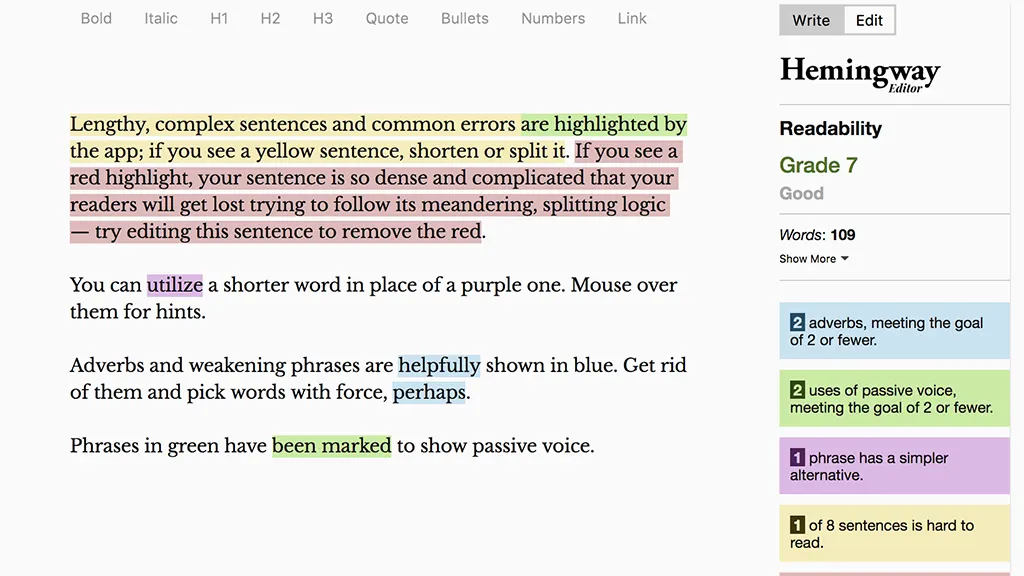
The Hemingway App aims to provide the basic, simple writing style that Ernest Hemingway pioneered.
However, it is not meant to serve as a broad editor and does not indicate the majority of spelling or grammar mistakes.
On the other hand, the app is a free ebook creator and is available on the web. The desktop version is available for both Mac (OSX 10.9+) and PC (Windows 7+) platforms and costs $19.99 one-time.
Top Features
Colour-Coded Writing Feedback:
Firstly, Hemingway Editor provides writing feedback by using various colours to highlight sentences that are hard to read, passive voice, and adverbs. The colour-code means:
- Red/Yellow: Sentences that are hard or very hard to read
- Blue: Unnecessary adverbs to avoid weak language
- Green: Passive voice
- Purple: Simpler phrase suggestions for complex words
Furthermore, it scores your writing out of 10, allowing you to see how easily your writing is understood. The lower the score, the easier and clearer your writing.
Suggestions for Sentence Simplification:
It also helps you to shorten your complex sentences to ensure enhanced readability and a better flow.
You can also use Hemingway Editor to detect grammar mistakes in your writing. It also provides quick corrections, ensuring enhanced readability
Besides, it also offers basic formatting tools, including:
- Headings
- Bold
- Italic
- Bullets
In addition to this, you can also use Hemingway Editor to publish your writing directly to platforms, such as WordPress.
Pros:
- The tool is free; you can sign up easily
- The premium account is 19.99 USD
Cons:
- There is no plagiarism checker
- The tool does not define the tone and style of writing
Which Ebook Software Tool is Right for You?
Now, the main question is how you can actually identify and pick the best ebook software tool for you? It is actually pretty easy. You just need to identify your needs and personal preferences.
Identify Your Needs:
The very first task is to identify your needs, which includes:
- Ebook Type:
Firstly, decide whether you want your ebook to be solely text-based, interactive, or graphic-rich. Also, ask yourself, do you need advanced formatting or multimedia integration?
- Technical Skills:
You must also identify whether you are actually comfortable with learning new software.
- Budget:
Another important consideration is your budget. Your budget will actually decide whether you can use premium features or the free versions.
- Distribution:
Also, you need to decide where you are planning to distribute your ebooks for a more precise software selection.
Consider Your Workflow:
In addition to this, you must also consider your workflow. Ask yourself, do you really prefer writing in a dedicated environment, or are you more comfortable writing in a word processor? Besides that, also identify your design skills. If you lack these skills, you can use user-friendly software like Designrr or Canva.
Examine Your Ebook’s Style:
If you want to choose the right platform for your ebook, you must consider the style of your ebook.
- Text-centric:
The very first thing to identify is the focus of your ebook. If it is text-based, then Google Docs might be the best choice for you.
- Visually Engaging:
Besides that, if you want to keep your ebook visually engaging, then consider Canva or Designrr.
Understand Your Goals:
You must also understand your goals to choose the best software for your ebook creation.
- Kindle-focused:
If your goal is to create a Kindle-ready ebook, then Kindle Create must be a great choice for you.
- Maximise Your Content:
Besides, if you want to transform your blog posts, images, or videos into an ebook quickly, then Designrr might be the best tool for you.
Know Your Budget:
Knowing your budget will allow you to decide whether you can invest in premium features or not.
- Budget-friendly:
Google Docs, Kindle Create, Canva (free plan), and Hemingway Editor (web version) are some of the free tools that don’t require you to invest your money.
- One-time Cost:
On the other hand, Scrivener, Vellum, and Atticus are some of the software that require a one-time investment.
This is a quick comparison of these tools based on their features:
| Features | Grammarly | Visme | Google Docs | Scrivener | Canva | Designrr | Vellum | Atticus | Kindle Create | Hemingway Editor |
|---|---|---|---|---|---|---|---|---|---|---|
| Text formatting | ✔ | ✔ | ✔ | ✔ | ✔ | ✔ | ✔ | ✔ | ✔ | ✔ |
| Image handling | ⨯ | ✔ | ✔ | ✔ | ✔ | ✔ | ✔ | ✔ | ✔ | ⨯ |
| Table of contents | ⨯ | ✔ | ✔ | ✔ | ✔ | ✔ | ✔ | ✔ | ✔ | ⨯ |
| Collaboration | ⨯ | ✔ | ✔ | ⨯ | ✔ | ⨯ | ⨯ | ✔ | ⨯ | ⨯ |
| Multimedia integration | ⨯ | ✔ | ✔ | ⨯ | ✔ | ✔ | ⨯ | ⨯ | ⨯ | ⨯ |
| Layout tools | ⨯ | ✔ | ✔ | ✔ | ✔ | ✔ | ✔ | ✔ | ✔ | ⨯ |
| Hyperlinks | ⨯ | ✔ | ✔ | ✔ | ✔ | ✔ | ✔ | ✔ | ✔ | ⨯ |
| Analytics | ✔ | ✔ | ⨯ | ⨯ | ✔ | ✔ | ⨯ | ⨯ | ⨯ | ✔ |
Ebook Software Comparison Table
To ensure that you make an informed decision, you must also use this comparison table as your guide:
| Tools | Best for | Learning | Cost | Standout Feature | Limitations |
|---|---|---|---|---|---|
| Grammarly | Checking grammar and improving writing | Very easy | Free and Premium subscription | Real-time grammar, tone, and style suggestion | You must choose the premium plan for advanced features |
| Visme | Creating presentations, ebooks, and visual content | Easy | Free/Pro ($12.25/per month) | Professional design templates | Has limited advanced writing tools |
| Google Docs | Collaborative writing and text-focused ebooks | Very easy | Free | Collaboration and auto-saving | Limited design and formatting tools |
| Scrivener | Writing long-form ebooks and novels | Moderate | $49 (one time) | Content organization | It is not design-focused |
| Canva | Designing ebooks and visual content | Easy | Free/Pro ($119.99/per year) | Customisable templates | Limited advanced formatting |
| Designrr | Transforming blog posts and PDFs into ebooks | Easy | $29/per month | Content organisation | Limited control over manual design |
| Vellum | Professional formatting for ebook and print book | Easy | $249 (one time) | Automatic book layouts | Only available on Mac |
| Atticus | Writing and formatting ebooks using one software | Easy | $147 (one time) | All-ione writing and publishing platform | Limited integrations |
| Kindle Create | Amazon Kindle Publishing | Very easy | Free | Kindle optimisation | Amazon-focused |
| Hemingway Editor | Improving clarity and readability in your writing | Very easy | Free web/ desktop $19.99 (one time) | Highlights complex sentences to improve clarity | Limited features for checking grammar |
Write Smarter, no harder
You do not have to write harder; it is not the 19th century. With all the tools available online, why not use them and make your ebook flow simply?
By using these 10 e-book software and tools, you will surely maximise your potential in writing, editing and proofreading.